R4z3r.apk.zip file ( android version)
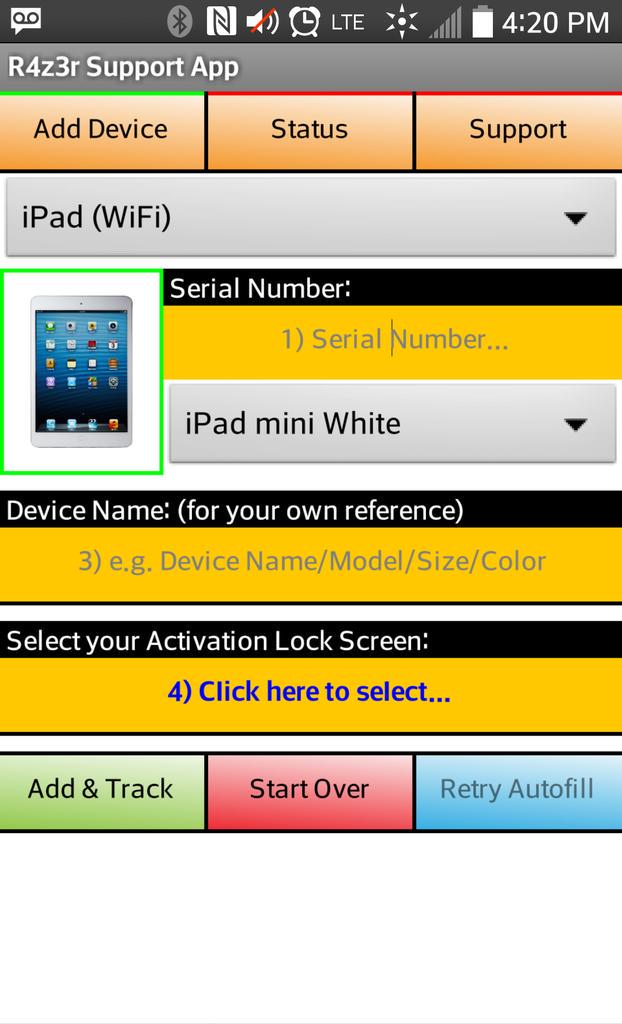
you can install this application directly from playstore
INSTRUCTION
-----------------------------------
Adding your iDevices
-----------------------------------
1) Click the "Add Device" button on the top navigation pane
2) Click "Select your iDevice..." and choose which one to add
3) Begin filling in the boxes, starting from your IMEI (if you have a cellular device) or Serial (WiFi Only)
4) [Cellular Only] If you have an IMEI and have entered it, click "AutoFill" which should turn green if in good format
5) [Cellular Only] Give the App a few seconds fetch your iDevice information. The status is shown above the IMEI.
6) [Cellular Only] If successful, the App will have filled out some information for you... Anything that has not been filled, please do so yourself.
7) Selecting your Model from the list will download the iDevice thumbnail straight away, ready for use
8) Select your Acivation Lock Screen by clicking the orange button, then tick the checkbox which shows which screen you have, then press "Confirm"
9) Once done, you will return to the form and should be ready to "Add & Track".
10) Click "Add & Track" once complete, and the App will warn you if you missed anything out, otherwise it will complete the process for you. DONE!
-----------------------------------
Tracking your iDevices
-----------------------------------
When on the "Status" tab, you are free to select any of your iDevices from the list to find out a bit more about it, and you can easier find the iDevice you want by using "Search"...
You can return back to your list by clicking the 'back key' on your phone.
Selecting one particular iDevice gives you a few administrative tools to monitor and manage your iDevice(s).
Tools:
[Share] You can share details about each of your iDevices in a line-by-line format, helpful in some cases on Twitter... (Model/IMEI/Serial/ActivationLock/FMI)
[Edit Title] This is independant from the model you select when adding; you can rename this to something you would refer to each iDevice as, if appropriate.
[Delete] You may find you have duplicates in your list, which the App is not yet ready to detect, so you can remove any one at any time after confirmation.
[Check FMI] This is only available to cellular iDevices as it is not possible for the App to check serial numbers; it will fetch the FMI Status of the selected iDevice.
[Mark as Un/Locked] The FMI checker doesn't always succeed in finding the FMI status, so this tool will manually change the lock status for you (Use Only For Reference - It Does Not Unlock Your iDevice!)
DOWNLOAD APP
ALTERNATIVE DOWNLOAD
here you can download directely from playstore android https://play.google.com/store/apps/details?id=appinventor.ai_r4z3r_app.R4z3r_Support
its free ( its not an icloud activator )
-----------------------------------
Future Updates
-----------------------------------
The Android App has been rushed, not to delay any important plans we have coming very soon, and plus, we have so many more ideas to add in the future, already noted.
What the App is, as of Version 1.0 is just the base of what's planned, so please bare this in mind when reflecting on our work and efforts.
-----------------------------------
Credits
-----------------------------------
Android App Developer: @R4z3r_Support
Activator and iOS App Developer: @_R4z3r_
you can install this application directly from playstore
INSTRUCTION
-----------------------------------
Adding your iDevices
-----------------------------------
1) Click the "Add Device" button on the top navigation pane
2) Click "Select your iDevice..." and choose which one to add
3) Begin filling in the boxes, starting from your IMEI (if you have a cellular device) or Serial (WiFi Only)
4) [Cellular Only] If you have an IMEI and have entered it, click "AutoFill" which should turn green if in good format
5) [Cellular Only] Give the App a few seconds fetch your iDevice information. The status is shown above the IMEI.
6) [Cellular Only] If successful, the App will have filled out some information for you... Anything that has not been filled, please do so yourself.
7) Selecting your Model from the list will download the iDevice thumbnail straight away, ready for use
8) Select your Acivation Lock Screen by clicking the orange button, then tick the checkbox which shows which screen you have, then press "Confirm"
9) Once done, you will return to the form and should be ready to "Add & Track".
10) Click "Add & Track" once complete, and the App will warn you if you missed anything out, otherwise it will complete the process for you. DONE!
-----------------------------------
Tracking your iDevices
-----------------------------------
When on the "Status" tab, you are free to select any of your iDevices from the list to find out a bit more about it, and you can easier find the iDevice you want by using "Search"...
You can return back to your list by clicking the 'back key' on your phone.
Selecting one particular iDevice gives you a few administrative tools to monitor and manage your iDevice(s).
Tools:
[Share] You can share details about each of your iDevices in a line-by-line format, helpful in some cases on Twitter... (Model/IMEI/Serial/ActivationLock/FMI)
[Edit Title] This is independant from the model you select when adding; you can rename this to something you would refer to each iDevice as, if appropriate.
[Delete] You may find you have duplicates in your list, which the App is not yet ready to detect, so you can remove any one at any time after confirmation.
[Check FMI] This is only available to cellular iDevices as it is not possible for the App to check serial numbers; it will fetch the FMI Status of the selected iDevice.
[Mark as Un/Locked] The FMI checker doesn't always succeed in finding the FMI status, so this tool will manually change the lock status for you (Use Only For Reference - It Does Not Unlock Your iDevice!)
DOWNLOAD APP
ALTERNATIVE DOWNLOAD
here you can download directely from playstore android https://play.google.com/store/apps/details?id=appinventor.ai_r4z3r_app.R4z3r_Support
its free ( its not an icloud activator )
-----------------------------------
Future Updates
-----------------------------------
The Android App has been rushed, not to delay any important plans we have coming very soon, and plus, we have so many more ideas to add in the future, already noted.
What the App is, as of Version 1.0 is just the base of what's planned, so please bare this in mind when reflecting on our work and efforts.
-----------------------------------
Credits
-----------------------------------
Android App Developer: @R4z3r_Support
Activator and iOS App Developer: @_R4z3r_
Comments
Post a Comment